For a long time I had the same problem with VPNs on Linux. Not one VPN — most of them. This post is about that problem, and about Genesis, the project I wrote to stop living with it.
The problem
I use VPNs for work. The provider gives you a client — GlobalProtect (Palo Alto) or OpenConnect, depending on the place. You connect, and then two things happen.
1. DNS stops working
Some versions of these clients could not write to resolv.conf (or could not talk to systemd-resolved correctly). The tunnel was up, I could reach the VPN network, but I could not resolve any internal host name.
If I asked the VPN’s DNS server directly, it worked:
dig @10.x.x.x internal.company.localSo the network was fine. The client just did not tell the system “use this DNS for these names”. I had to fix it by hand every time: edit resolv.conf, or add a resolvectl dns line, or restart systemd-resolved. Sometimes the client overwrote it again a minute later.
2. The default gateway changes
This is the part I hated the most. Many VPN clients replace your default route. After you connect, all your traffic goes through the tunnel — YouTube, package updates, your own home services, everything.
Why? I need the VPN for a few internal sites. I do not need my whole machine to leave through the company network. It is slower, it breaks local things, and the company sees traffic that has nothing to do with work.
The usual answer is “set up split tunneling”. But that depends on the client. Some support it, some do not, some support it only if the admin allows it. And it does not solve the DNS part.
What I actually wanted
When I wrote down what I wanted, it was short:
- Resolve these domains using this DNS server on this interface.
- Send connections to these domains / IPs through this interface.
- Leave everything else alone. Default gateway stays my own.
- Do not touch the main routing table, do not fight with the VPN client.
I could not find a tool that did exactly this in a simple way, so I built one.
Genesis
Genesis is a small Linux agent written in Go. It runs as a systemd service and does two jobs:
A local DNS stub. It listens on 127.0.0.1:5553. When a query comes in, it checks the rules. If the domain matches a rule, it asks that rule’s DNS server (for example the VPN’s DNS). If not, it uses the normal upstream.
Connection pinning. When a rule matches, the resolved IPs are pinned to the interface in that rule using netlink policy routes. Only those IPs leave through that interface. Everything else uses your normal default route.
A rule looks like this:
rules:
  - name: work
    match:
      domains: ["*.company.local", gitlab.company.com]
    dns: 10.0.0.53          # VPN DNS
    interface: tun0          # VPN interface

  - name: blocked-sites
    match:
      domains: [example-blocked.com, "*.example-blocked.com"]
    dns: 1.1.1.1
    interface: CloudflareWARP
First match wins. There is also a default_path section if you want unmatched traffic to go somewhere specific, but by default Genesis does not change your default gateway at all.
Genesis uses its own routing tables (18000–18999) and its own rule priorities. It never edits the main table and never brings an interface up or down. If the VPN interface goes down, a rule can be fail_closed (drop) or fail_open (fall back to normal).
How my setup looks now
Today my machine works like this:
| Traffic | Goes through |
|---|---|
| Internal work sites | work VPN (tun0), with the VPN’s DNS |
| Blocked / filtered sites | Cloudflare WARP |
| Everything else | my own interface, my own DNS |
I connect the work VPN, and nothing else changes. My default gateway is still mine. My downloads are still fast. Internal hostnames resolve because Genesis asks the right DNS server for them — the VPN client does not have to write anything to resolv.conf.
The system DNS points to Genesis through systemd-resolved split DNS. There is a script in the repo for that:
./scripts/host-resolved-modeb.sh install 5553And genesis-ctl status tells me what is going on:
config:   /etc/genesis/config.yaml
web ui:   http://127.0.0.1:8787 (reachable)
dns:      udp 127.0.0.1:5553
pins:     netlink
default:  eno1 (mode netlink)
rules:    2
service:  genesis.service active
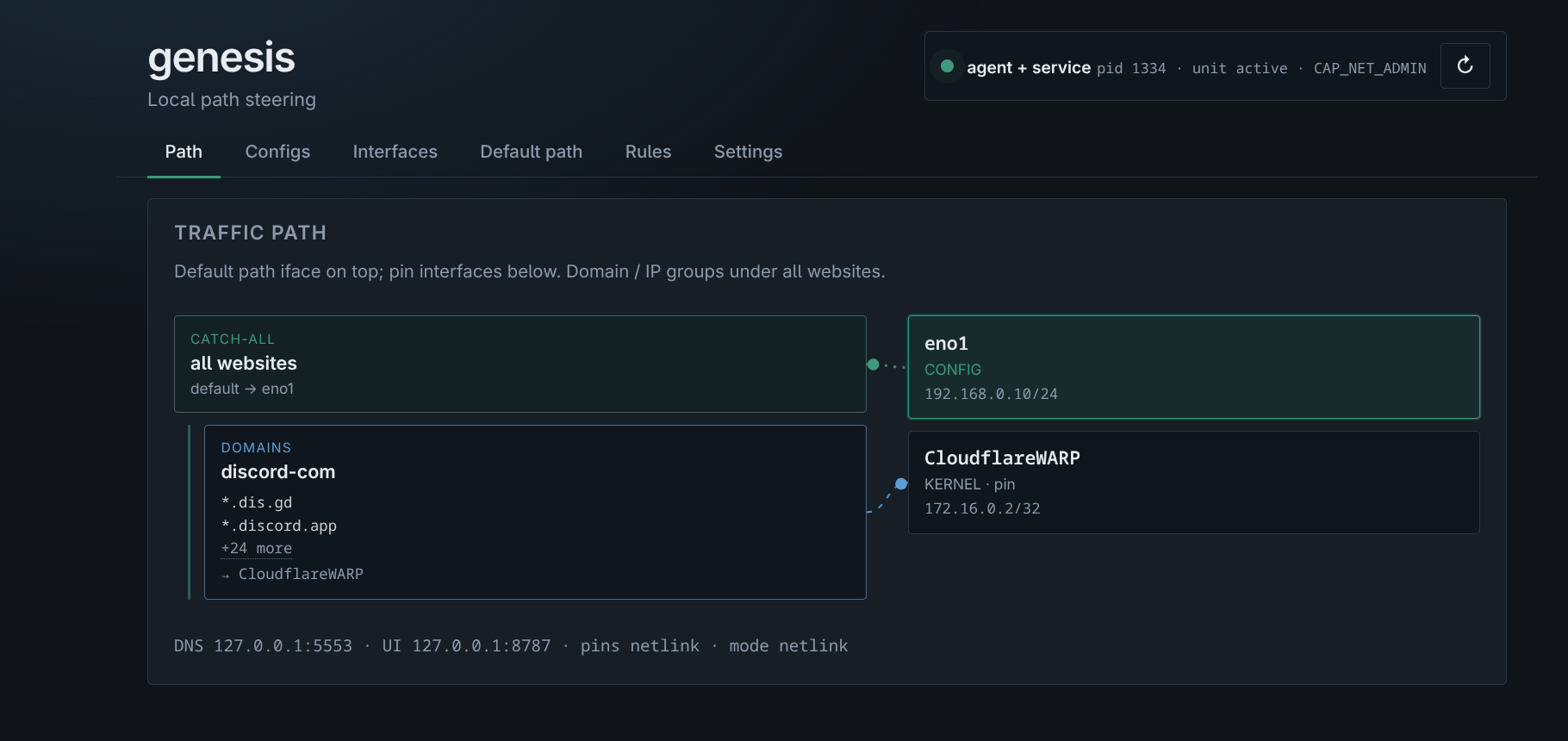
There is also a small Web UI on 127.0.0.1:8787 for adding rules without editing YAML. The Path tab shows the whole picture: the catch-all on top (everything → eno1), and the pinned groups below it (Discord domains → CloudflareWARP).
What I learned
The first version was just a DNS proxy. It fixed the DNS problem, but connections still went out through whatever route the VPN had set. The pinning part — using policy routing per IP instead of changing the default route — is what made the idea actually work.
I also learned that systemd-resolved is not the enemy. Once I stopped trying to overwrite resolv.conf and used split DNS properly, the whole thing became stable.
Try it
The code, build steps, and a Fedora RPM are on GitHub: osmancoskun/genesis.
git clone https://github.com/osmancoskun/genesis.git
cd genesis
make build
sudo make install ENABLE=1
It is a personal project and it fits my use case. If it fits yours too, or you find something broken, open an issue.